Sales Second Brain
A digital system that stores, organizes and retrieves the sales team's information, notes and learnings.









At a glance
- Role
- AI Martech Manager. I owned the product, the roadmap, the architecture decisions and the team onboarding.
- Timeframe
- June 2026 to present. Shipped, and in daily use by the US and UK sales teams.
- Team
- An engineer from an external development partner and a brand designer. I was the only product and domain owner.
- Built with
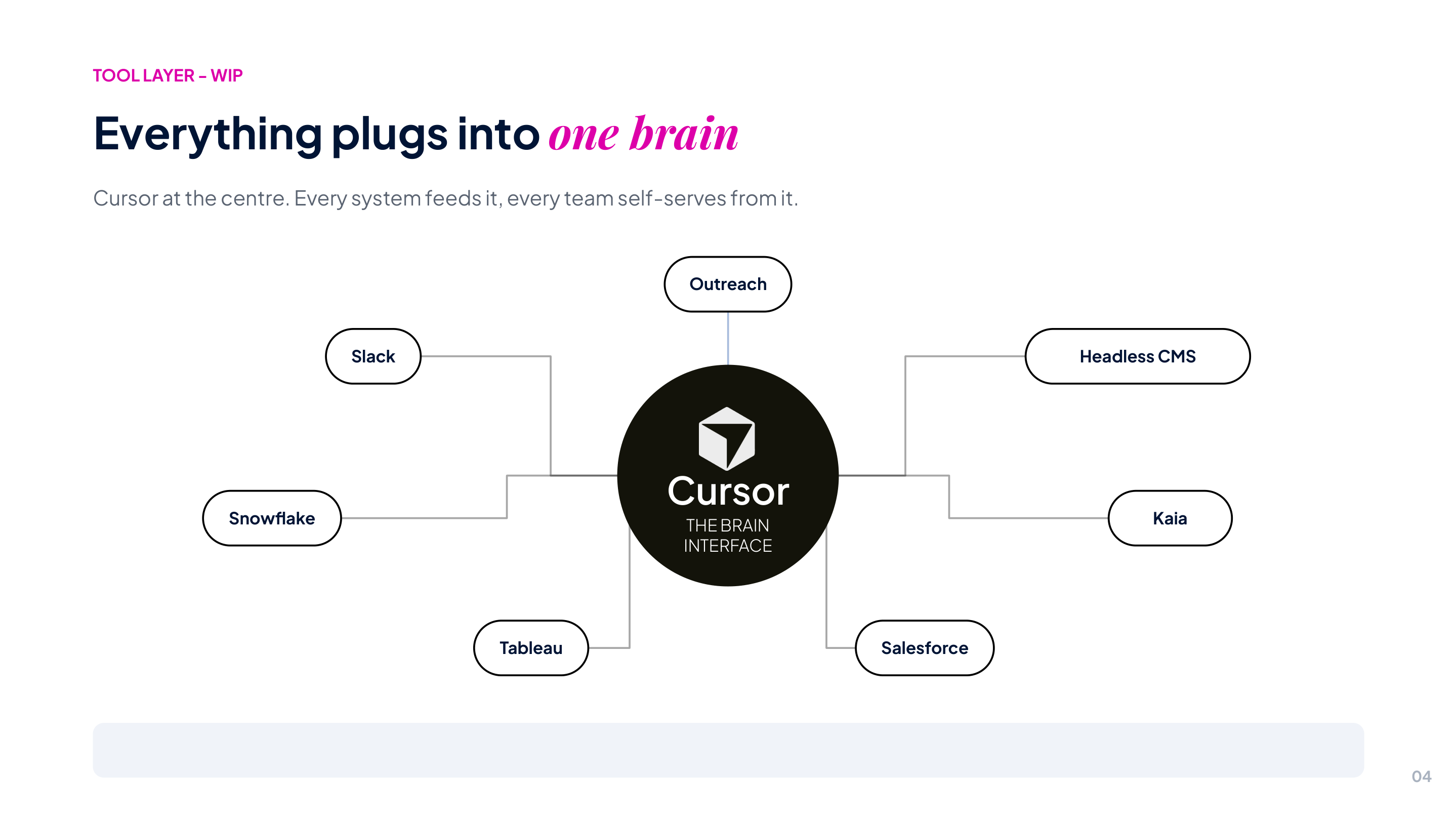
- Model Context Protocol, Cursor and Claude plugin architecture, Relevance AI, OpenAI, Google Drive, Outreach, Salesforce, Slack.
The problem
Four problems, and the third one made the first two worse.
The same research, over and over
Every seller rebuilt the same picture of an account before every call. That work was thrown away the moment the call ended, so the next person started from nothing.
Knowledge with no home
Calls sat in a recording tool, emails in Outreach, pipeline in Salesforce, positioning in Drive, and the rest in whoever happened to run the account. No single place answered the question “what is going on with this client.”
An assistant nobody could trust
A general AI assistant answers confidently whether or not it knows anything. In sales that is not a small flaw. One invented number in front of a client costs more than the tool saves, so sellers stop using it, and adoption dies quietly.
Every deck and one-pager built by hand
A sales deck took hours in Figma or PowerPoint, a one-pager took most of an afternoon, and fonts, colors and spacing drifted off-brand from asset to asset. One team was the bottleneck for every request, and every new asset re-solved problems that had already been solved.
What was built
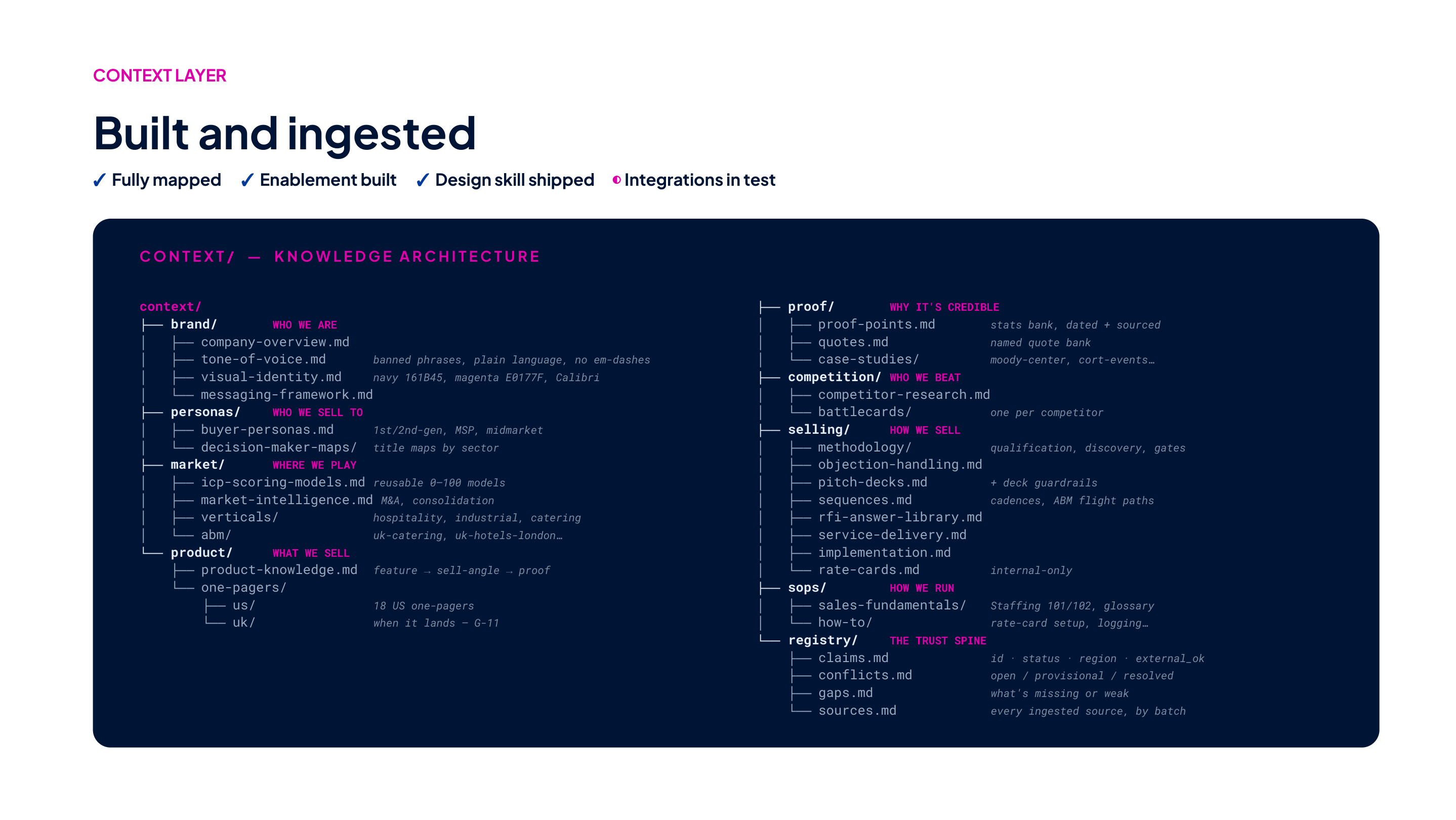
One knowledge layer, with 16 skills on top of it. The layer is the part that matters.
The asset here is not the assistant. It is what sits underneath: every account, call, email and piece of positioning the company owns, written down in one place with its source attached. That gets more complete every month, and it would survive being pointed at a different model, a different editor, or whatever replaces both in two years.
Marketing campaigns now live there too, one folder per campaign from brief to learnings. The first one is an automated Meta campaign, built with an AI agent from account setup to creative and launch.
The skills are the replaceable half. Sixteen of them read the same layer, and they run inside the tools sellers already have open so there is no new application to log into: cited question and answer, live enrichment, a value selling methodology engine, a voice layer that makes output read like the seller who sends it rather than like an AI, and a branded asset generator.
The generator covers decks, one pagers, tenders and RFP responses, ebooks, email headers, business cards and motion. It refuses to ship a bad one. A build fails on dead space rather than leaving it to the eye, a photograph is cropped against the faces in it rather than its center, and the brand fonts travel inside the file so PowerPoint cannot quietly substitute its own.
A separate admin plugin handles analytics, feedback and suggestions for skill improvements.
Architecture
Two MCP servers in front of one knowledge base. One reads, one runs governed research, and neither of them can write.
Scroll to see the full diagram
Design decisions
Five calls that decide whether a system like this gets used or quietly abandoned.
Navigate, do not search
The obvious build is full text search over everything. We did the opposite. The knowledge base is a catalog plus one folder per company, and the assistant browses it the way you would browse a well organized wiki: find the company in the index, open its folder, read the page whole.
Search returns fragments that look relevant and often are not. Navigation returns the actual page. It is more precise, it costs a fraction of the tokens, and it fails visibly instead of silently.
Cite every claim, or do not make it
Every fact in an answer carries the path of the page it came from, so a seller can check it in one click before it reaches a client. If the knowledge base does not cover something, the assistant says so and names the source that would need to be added. It is not allowed to fill the gap from general knowledge.
This is the decision that bought trust. Sellers do not need an assistant that is right most of the time. They need one that is honest about which of the two it is being.
The assistant cannot write
There is no write tool in the assistant’s scope at all. Not a restricted one, not a permissioned one. The backend owns every write to the knowledge base.
The cost is real: users cannot tell the system to remember something, and that surprises people. The benefit is that a shared source of truth used by a whole sales team cannot be corrupted by one confused chat session. For a system whose only asset is trust, that trade is worth making.
Rules the model cannot talk itself out of
Every rule above started life as an instruction. Answer from the knowledge base. Cite the page. Use the governed research path, not a raw one. Instructions are advice, and a guardrail that is only advice is not a guardrail. A capable model follows them, a weaker one skips them, and nobody finds out until the output is already in front of a client.
So the rules that can be enforced by tool identity now are. A check runs in front of every tool call and blocks the ungoverned research API outright, because that case is unambiguous: our own servers have their own names, so there is nothing to misread. Rival enrichment tools are pointed at the governed path instead of blocked, because that check never sees the question and cannot know whether a given call is about our account or someone else’s.
That line is the decision. Hard enforce only what can be enforced without guessing, and leave the rest as instruction rather than break legitimate work in order to look strict.
Research once, then reuse
A live research run does two things. It answers the person waiting, clearly labeled as fresh and not yet filed. It also queues the result for ingestion, so the same question next month is a cited page instead of another paid research run.
Every filed result carries a date stamp, so a seller can see at a glance how stale it is and rerun the research themselves if the account has moved on.
That turns the tool from an expensive lookup into an asset that gets more valuable the more the team uses it.
How I delivered it
I ran this as the product owner with an engineer from an external development partner on a fixed hour contract and an internal brand designer. I set the roadmap, made the data and architecture calls, and ran the rollout. Four decisions were mine.
Two connections to one system, because neither was enough
Pulling sales activity out of Outreach looked like a one connector job. It was not. The HTTP API returned full account and email data but truncated call transcripts. The MCP interface returned full transcripts through GraphQL but lacked the application level access points. Each alone produced a knowledge base with a hole in it.
We reviewed 38 endpoints and built against both, handled server side so the plugin never had to know.
One server, two scoped roots, for the UK expansion
The US rollout worked, UK leadership saw a demo, and the UK team asked for their own. The default answer is a second deployment. That would have duplicated a multi gigabyte shared asset library and doubled the maintenance surface for a team of one engineer.
Instead: one server, two top level content roots, and access scoped by token. A UK token has no awareness of US data and the reverse holds. Shared material lives once at the top level and compiles into both regions. Region specific material sits in its own root.
Designing the running cost down
A system that reprocesses everything nightly with a language model has a bill that grows with the knowledge base. So the sync filters on last updated time and only touches records that actually changed. Pipeline data is written deterministically with no model call at all. A cheap cache check runs before a new company folder is created, so the same account does not get filed twice under two spellings.
The bill is the test of whether that worked. Six hundred and thirty four million input tokens have gone through the pipeline across roughly nine thousand model calls, and three quarters of those tokens were served from cache rather than paid for at full rate.
The advice going around is to burn tokens rather than headcount, and for work that produces something new I agree with it. This is the other half of the same argument. Reprocessing a record that has not changed since last night produces nothing, and a pipeline that does it anyway spends its budget on waste instead of on the questions people are actually asking. Be cheap where the work is mechanical, so there is room to be generous where the work is thinking.
Shipping a fix without asking fifty people to reinstall
There was no channel to publish to, so every install was a zip file and a manual step. That is fine for ten people and untenable for fifty. Every fix meant asking the whole sales team to reinstall, and the ones who did not were quietly running a version I had stopped supporting.
So the bundle updates itself. It checks its own release channel about once an hour, verifies the download against a checksum, refuses anything older than what is already installed, and swaps it in atomically. Credentials never cross the wire: the release ships without them and each install puts its own back in locally. Nothing changes mid conversation, and the new version is picked up on the next window reload.
Where it stands
Rollout
- June 2026 Knowledge base and plugin builtWiki structure, citation model, and the read only access layer. Shipped to a small internal group first.
- August 2026 Demo to the sales team and CEOAround 25 people. Deliberately not a technical walkthrough. Two workflows shown end to end, with feedback collected through a form rather than a channel thread.
- August 2026 Sales activity connectorCalls, emails, and pipeline compiled per company, with parent accounts and their individual sites handled separately. Full transcripts stored alongside summaries, with citations on every claim.
- September 2026 UK expansionRequested by UK leadership after a demo. Delivered as token scoped regional roots on the existing server.
- September 2026 Self updating distributionThe bundle checks its own release channel, verifies the download and swaps itself in. Ends the reinstall request to fifty people every time something is fixed.
- September 2026 Measurement, and a feedback channel inside the toolAdoption is recorded rather than estimated. The first ten days of September carried 2,100 questions from 47 people, against 518 across the whole of August. Reporting a problem became a command that attaches the tail of the conversation and the tool calls behind it, so a bug no longer has to be reconstructed from memory.
Where this is going
Today the system tells you what it does not know. Next it should go and find out.
Here is what happens now. A seller asks about a company we have never worked with. The assistant says there is no page for it and names the source that would have to be added. That is the right answer and it is the reason people trust the thing. Then nothing happens. The gap sits there until a person notices, and the next seller who asks that question gets the same empty answer.
The system should close that gap by itself, and three of the four parts it would need already exist. Every question is logged, so it knows which ones failed. Enrichment can already research a company on request. The backend already owns every write, so there is one safe route for a new page to arrive. What is missing is the part that connects them.
Read the questions that failed
Every unanswered question is already recorded and nobody reads the list. It is the most useful thing this system produces, because it says in the sales team’s own words what they needed and did not get.
Decide which kind of gap it is
There are three, and each has a different fix. No page for the company, so research it and file it. A page that exists but is out of date, so rebuild it from the latest calls and pipeline. Or a question the wiki was never built to answer, which is the one that should come to me rather than be guessed at.
Ask the question again the next morning
If it comes back with a cited answer, the gap is closed. If it does not, it goes back in the queue rather than being marked done. Without that check there is no loop, only a to do list that fills up.
None of this changes what a seller does. They ask questions the same way they do now, and over months fewer of those come back empty, without anyone having to file a request for the page they needed.
There is a line I would not cross to get it. This loop can research a company, refresh a stale page and rebuild one from newer data. It cannot decide what is true about a client. Everything it produces still arrives through the backend with its source attached, and the assistant still has no way to write. A system that repairs itself is worth building. A system that can quietly change what the sales team believes is not.